
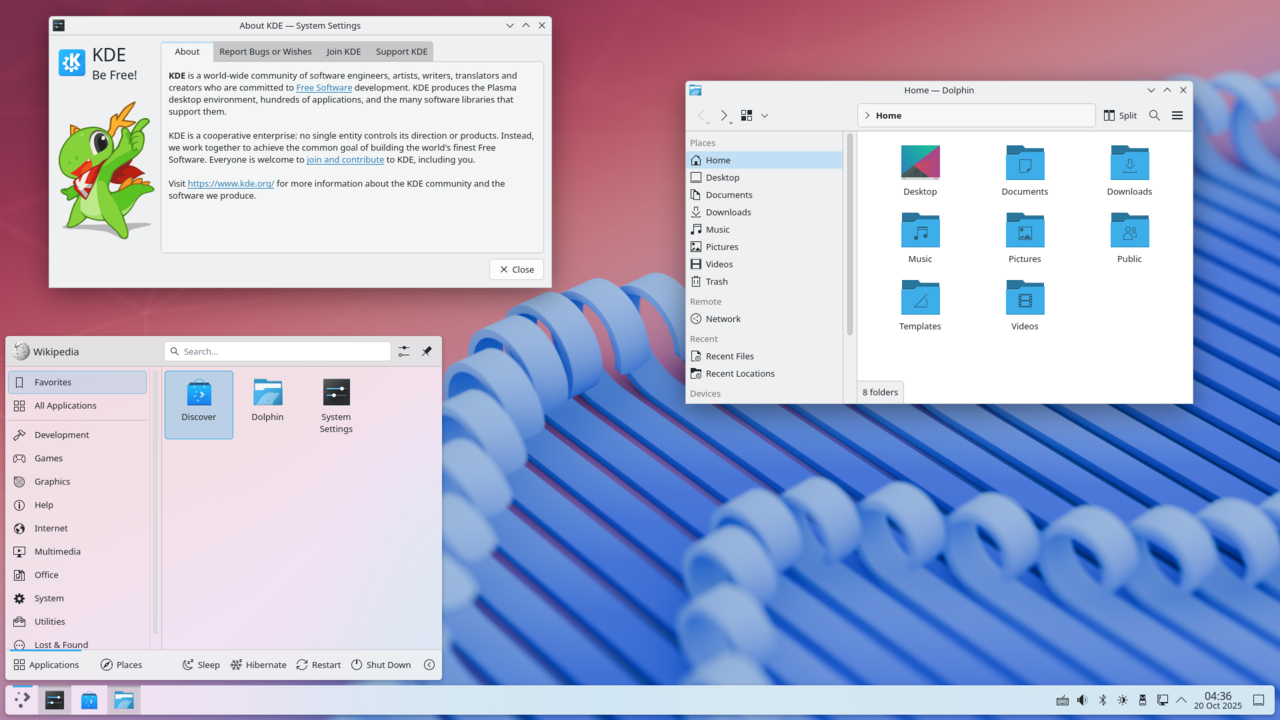
KDE Plasma 6.8 introduces significant changes, including the removal of X11 sessions. This update is crucial for users looking to enhance their Linux experience.
What’s New in KDE Plasma 6.8?
KDE Plasma 6.8 has recently been released, bringing a host of new features and improvements that cater to both casual users and developers. This latest version marks a significant milestone, as it drops support for X11 sessions after 30 years, pushing users towards the more modern Wayland display server.
Among the notable enhancements in KDE Plasma 6.8 are:
- Improved Performance: The overall responsiveness of the desktop environment has seen substantial improvements, making it smoother and faster than previous versions.
- New Widgets: Users can now enjoy a variety of new widgets that enhance usability and aesthetics, including an updated weather widget and enhanced media controls.
- Enhanced Customization: The customization options have been expanded, allowing users to personalize their desktop experience even further. This includes new themes and icon packs.
- Accessibility Features: KDE Plasma 6.8 introduces better accessibility options, making the interface more user-friendly for those with disabilities.
- Updated Applications: Several default applications have been updated with new features, performance enhancements, and a refreshed user interface.
With these updates, KDE Plasma 6.8 positions itself as a compelling choice for users looking to upgrade their desktop experience while embracing modern technologies.
Why X11 Sessions Were Dropped
The recent release of KDE Plasma 6.8 marks a significant milestone in the evolution of the KDE desktop environment, particularly with the decision to drop support for X11 sessions. This change, after three decades of X11’s presence in the KDE ecosystem, has raised eyebrows among users and developers alike.
One of the primary reasons for this shift is the need for a more modern and efficient graphical system. The X11 protocol, while historically significant, has limitations that hinder the performance and capabilities of contemporary applications. Dropping X11 sessions allows KDE to fully embrace the Wayland protocol, which offers enhanced security, smoother graphics, and better support for high-DPI displays.
Another factor contributing to this decision is the growing community support and development focus on Wayland. As more applications and desktop environments transition to Wayland, KDE aims to ensure compatibility and provide a seamless experience for users. By eliminating X11, KDE Plasma 6.8 can streamline its features and deliver a more cohesive user experience.
Some users may be hesitant about this transition, fearing potential issues with application compatibility. However, the KDE development team has assured users that they are committed to addressing these concerns and providing alternatives. The move to drop X11 sessions signifies a bold step forward for KDE, positioning KDE Plasma 6.8 as a cutting-edge desktop environment ready for the future.
User Reactions to KDE Plasma 6.8
User reactions to KDE Plasma 6.8 have been largely positive, with many users expressing excitement about the new features and improvements. The release has sparked discussions across various forums and social media platforms, where enthusiasts share their experiences and opinions.
Many users have highlighted the following aspects of KDE Plasma 6.8:
- Performance Improvements: Users have noted a significant boost in performance, particularly on older hardware, making the desktop environment more accessible.
- User Interface Enhancements: The revamped UI has received praise for its modern look and feel, with smoother animations and a more cohesive design.
- Customization Options: The extensive customization capabilities continue to be a favorite among users, allowing them to tailor their desktops to fit their preferences.
- Removal of X11: While some have expressed concern over the dropping of X11 sessions, many have acknowledged the necessity for progress and the advantages of Wayland.
Overall, users seem to agree that KDE Plasma 6.8 is a solid upgrade, bringing a blend of innovation and user-friendly features that enhance the overall experience. As discussions continue, it will be interesting to see how the community adapts to the changes and what future updates will bring.
How to Upgrade to KDE Plasma 6.8
Upgrading to KDE Plasma 6.8 is a straightforward process that can significantly enhance your user experience. Here are the steps to ensure a smooth transition:
- Backup Your Data: Before initiating the upgrade, it is crucial to back up important files and settings to avoid any potential loss during the process.
- Check System Requirements: Verify that your hardware meets the requirements for KDE Plasma 6.8. Ensuring compatibility will help prevent issues post-installation.
- Update Current System: Make sure your existing operating system and applications are updated to the latest versions to facilitate the upgrade.
- Access Your Package Manager: Depending on your Linux distribution, open your package manager. For instance, users of Ubuntu can utilize the terminal or the Software Updater tool.
- Install KDE Plasma 6.8: Search for KDE Plasma 6.8 in the package manager. You may find it listed as either a standalone package or as part of a larger desktop environment upgrade.
- Follow Installation Prompts: Proceed with the installation by following the on-screen instructions. This may involve confirming dependencies and required packages.
- Reboot: Once installation is complete, reboot your system to apply the changes and start using KDE Plasma 6.8.
By following these steps, users can easily transition to the latest version and enjoy its new features and improvements.
Is KDE Plasma 6.8 Worth It?
The release of KDE Plasma 6.8 has prompted many users to evaluate whether the latest version is worth the upgrade. With significant changes and improvements, it is essential to consider the benefits against potential challenges.
One of the most notable aspects of this release is its enhanced performance and streamlined interface. Users have reported faster boot times and improved responsiveness, making everyday tasks more enjoyable. However, the transition away from X11 sessions has raised concerns about compatibility with older applications.
Many users are wondering if their favorite software will still function seamlessly. In response, the KDE team has emphasized that most applications should run smoothly under Wayland, the new default session. Nevertheless, some users may experience difficulties, particularly if they rely on niche tools that have not yet been optimized for this environment.
Additionally, the community’s feedback is mixed. While many embrace the fresh features and cleaner aesthetics, others are hesitant to leave behind the familiarity of previous versions. For those who prioritize stability over new features, the decision to upgrade may require further contemplation.
Ultimately, whether KDE Plasma 6.8 is worth it depends on individual needs and preferences. Users who value innovation and efficiency may find the upgrade beneficial, while those who prioritize compatibility might want to wait for further refinements.
Comparing KDE Plasma 6.8 to Previous Versions
As users explore the new features and enhancements in KDE Plasma 6.8, it is essential to compare it with previous versions to understand its significance and potential impact on user experience. The transition from earlier iterations has been marked by several improvements that aim to streamline performance and enhance usability.
One of the most notable changes in KDE Plasma 6.8 is its refined interface, which offers a more modern and visually appealing aesthetic compared to its predecessors. Users have reported a smoother experience, thanks to optimizations in resource management and responsiveness.
Another critical area of improvement is the integration of new technologies that enhance functionality. For instance, the updated widget system allows for greater customization, enabling users to tailor their desktops to fit their specific needs more easily. This feature was a significant request from the community and represents a departure from the more rigid structures of earlier versions.
Performance benchmarks show that KDE Plasma 6.8 outperforms previous versions in various tasks, making it a strong contender for users seeking efficiency. However, some may find the learning curve slightly steeper due to the introduction of new settings and options.
Overall, while there are adjustments to adapt to, the comparison indicates that KDE Plasma 6.8 stands out as a worthwhile upgrade for both new and veteran users.
via Wikimedia Commons
Where this came from
You might also like
Thwaites Glacier Sea-Level Rise: Worst Projections Revealed · Xiaomi 15 features: What are the best and proven specs? · Starlink and India’s Satcom Policy: A Clear Overview







Leave a Reply